FAQ
사용법에 대하여
Q
클라우드 브러시는 어디에서 다운로드 하나요?
A
클라우드 브러시를 다운로드 하는 방법은, 아래와 같습니다.


Q
스크린톤 소재는 웹용 인가요? 인쇄물에도 사용이 가능한가요?
A
스크린톤 소재는 350dpi, 600dpi의 2종류가 존재합니다.
인쇄물의 경우에는 600dpi의 소재를 사용해 주세요.
웹 용의 경우에는 2종류 모두 사용이 가능합니다.
문제 발생에 대하여
Q
펜 테블릿의 필압이 제대로 인식되지 않습니다.
A
PC를 재부팅하고 문제가 해소되는지 확인해주세요.
PC를 재부팅해도 문제가 해소되지 않을 경우, 다음 방법을 시도해주세요.
Wacom 태블릿을 사용할 경우
- 태블릿 드라이브를 삭제한 후, 불필요한 파일을 완전하게 삭제해주세요.(불필요한 파일 삭제 방법은 메이커에 문의해주세요.)
- 메이커 드라이브 다운로드 페이지에서 사용하시는 태블릿과 PC의 OS에 맞는 최신 버전 드라이브를 다운로드해서 올바른 순서로 설치해주세요.
- PC를 재부팅해주세요.
Wacom이외의 메이커 태블릿을 사용할 경우
사용하시는 태블릿 드라이브를 최신 버전으로 업데이트해서 문제가 해소되는지 확인해주세요. 드라이브를 갱신해도 문제가 해소되지 않을 경우, 메뉴「파일」→「환경설정」에서 다음 순서로 문제가 해소되는지 확인해주세요.- 「브러시 좌표」항목을 바꿔본다.
- 「필압검출」의「OS 네이티브 필압검출을 유효로 한다」에 체크를 해제해본다.
- 「필압검출」의「태블릿 이벤트를 무시한다」에 체크해본다.
- 「필압검출」의 체크 상태를 바꿔 제대로 작동하는 조합을 찾는다.
- 「펜 태블릿」의「HUION 태블릿에서 오류가 있는 경우에 체크」에 체크를 해본다.
Q
【Windows】 Can’t install Medibang Paint
A
When you download MediBang Paint for Windows, you will be asked if you can install the "vc++ Runtime". If you get a failure message when you try to install the c++ runtime, you may have downloaded the old c++ runtime.
In that case, please do one of the following
1.Uninstall your current VC++ runtime and reinstall MediBang Paint.
2. Uninstall the VC++ runtime, re-install the VC++ runtime, and then reinstall MediBang Paint.
3. Press "No" in the VC++ runtime installation confirmation dialog and install MediBang Paint only. (It may fail to install MediBang Paint if you do this.
Q
소프트에 관한 문의는 어디로 보내면 되나요?
A
문의 페이지를 통해 문의 주시기 바랍니다.
Q
메디방페인트의 만화제작기능을 사용 할 수가 없습니다…
A
메디방페인트의 만화제작기능을 전부 사용하기 위해서는 로그인이 필요합니다.
로그인 하기 위해서는 메디방의 계정이 필요하오니, 계정을 가지고 있지 않으신 분께서는 신규등록(무료)해 주시기 바랍니다.
각 종류 권한에 대하여
Q
메디방페인트의 소재를 사용하여 제작한 작품을 공개하거나 판매 할 경우, 별도로 허가를 받아야 하나요?
A
개인・상업용으로의 공개, 판매가 가능합니다.
별도의 허가는 필요하지 않습니다, 많은 이용 부탁드립니다.
MediBang Premium에 대하여
Q
MediBang Premium 결제로 2번 과금되었다
A
이용하시는 카드회사에 따라 구매 시 출금이 이러어진 후 한번 환불처리가 이러어지며,다시 인출이 발생할 경우가 있갰지만 저희 회사의 청구는 최종적으로 대상 상품분의 구입 금액만청구입니다.자세한 내용은 사용하시는 카드회사에 문의 해주시기 바랍니다.
Q
What is a “Friend Team”?
A
This is the team you belong to, and the one of the other users would be the "owner" of the team.
Q
MediBang Premium를 해지/자동 갱신을 정지하려면?
A
【앱 내 구입으로 결제하신 경우】
구입하신 앱스토어에서 해지하실 수 있습니다.
해지 방법은 각 스토어의 지원 페이지를 참고하세요.
▽App Store의 경우
https://support.apple.com/ko-kr/118428
▽Google Play의 경우
https://support.google.com/googleplay/answer/7018481
【Web에서 결제하신 경우】
사용자 정보 페이지에서 "가입 중 플랜"의 "종료일"에 기재가 있는 "해지하기"를 선택하시면 자동 갱신을 정지할 수 있습니다.
※자동 갱신을 정지한 경우에도 종료일까지는 MediBang Premium를 이용하실 수 있습니다.
사용자 정보 페이지는 여기
https://medibang.com/myProfile/premium/
◯WebMoney 및 AliPay에서 결제하신 경우
자동 연장 안됨으로 따로 해지 수속을 안하셔도 됩니다.
Q
How do you check the number of “Team Affiliation”?
A
【For PC Users】
You can check your Team Affiliation from the link below.
https://medibang.com/creators/myteam/
※You must have a MediBang account to access this webpage.
【For iPad, iPhone, Android Users】
You can check your Team Affiliation by clicking on "Check My Plan" on the app's main menu.
Q
What is the Renewal Period?
A
During this period you can extend MediBang Premium your annual memberships and/or downgrade your cloud storage 30 days early from the effective date.
The process on how to upgrade your cloud storage will remain the same separate from the effective date.
Q
What is the difference between the Cloud Storage’s “File Size” and “Storage Usage”?
A
"File Size: is the amount of mdp file capacity saved to your cloud storage.
"Storage Usage" is the amount including the "file size" as well as the file's "version information".
Q
How do you check your membership status?
A
【For PC Users】
You can check your membership status from the link below.
https://medibang.com/myProfile/premium/
※You must have a MediBang account to access this webpage.
【For iPhone, Android Users】
Access the "Check my Plan" button located on the far top left of the app's main menu to check your membership.
【For iPad Users】
Access the "Check my Plan" button located on the left side menu of the app's main menu to check your membership.
Q
How do you check your cloud storage?
A
【For PC Users】
You can check your membership status from the link below.
https://medibang.com/myProfile/premium/
※You must have a MediBang account to access this webpage.
【For iPhone, Android Users】
Access the "Check my Plan" button located on the far top left of the app's main menu to check your membership.
【For iPad Users】
Access the "Check my Plan" button located on the left side menu of the app's main menu to check your membership.
Q
MediBang Premium이 갑자기 사용할 수 없게 되었습니다.
A
아래 FAQ에 적혀 있는 대응 방법을 시도해 보십시오.
https://medibangpaint.com/faq/37934/
Q
「MediBang Premium」을 구매하려면 계정 등록이 필요합니까?
A
【웹으로 구매하시는 분】
MediBang계정 등록이 필요합니다.
【Apple Store, Google Play Store로 구매하시는 분】
MediBang계정 등록 없이도 구입할 수 있지만 일부 기능(버전 관리나 클라우드 스토리지 등)을 이용할 수 없기 때문에MediBang계정 등록 후 로그인하여 이용하시는 것을 추천드립니다.
Q
클라우드 스토리지 상한을 초과하면 어떻게 됩니까?
A
클라우드 스토리지의 상한선을 초과하면 새롭게 작품을 저장하거나 팀 이동할 수 없게 되며 클라우드 스토리지 내의 작품을 MediBang Paint에서 열 수 없게 됩니다.
이 경우「MediBang Premium」에 가입해 스토리지 용량을 추가하는 것을 추천합니다.
※스토리지 초과분의 작품 파일은 일정 기간 내에 삭제됩니다.
Q
MediBang Premium 이용요금은 얼마에요?(web으로 구입)
A
각 플랜의 요금은 다음과 같습니다.
[MediBang Premium]
가격:24,800원/년
클라우드 용량:20GB
[MediBang Premium100]
가격:39,800원/년
클라우두 용량:100GB
[MediBang Premium300]
가격:79,800원/년
클라우드 용량:300GB
Q
구입한 유료 옵션 플랜(크리에이티브 팩 등)은 계속 이용할 수 있습니까?
A
계속 이용 가능합니다.클라우드 용량·팀 가입 수·버전 관리 상한에 도달한 경우는「MediBang Premium」가입을 추천합니다.
Q
How can I pay for my Medibang Premium?
A
【For iPad, iPhone, Android Users】
Choose your mode of payment from your platforms' app stores.
【For PC Users】
You can use your credit card, and services such as WebMoney and Alipay and PayPal and Amazon Pay.
Q
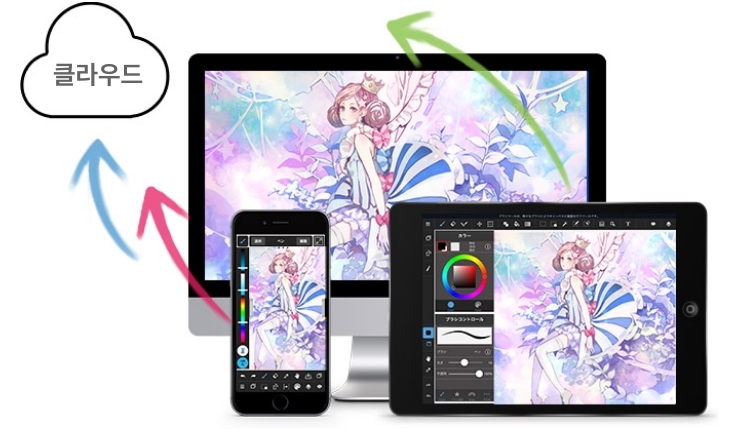
클라우드 스토리지라는 무엇입니까?
A
클라우드 스토리지에 대한 자세한 내용은 이쪽에서 확인하실 수 있습니다.
https://medibangpaint.com/cloud/
Q
팀 제작이라는 무엇입니까?
A
팀 제작에 대한 자세한 내용은 이쪽에서 확인하실 수 있습니다.
https://medibangpaint.com/team/
Q
바전 관리라는 무엇입니까?
A
클라우드 스토리지에 저장된 작품의 저장 이력을 관리할 수 있는 기능입니다.
버전 관리 기능부터 과거 저장 상태를 확인하거나 최신 버전을 포함한 3세대까지 호출이 가능합니다.
※MediBang Premium에 가입하면 작품 버전 호출이 최신 3세대부터 무제한이 됩니다.
※이 기능을 이용하려면 MediBang 계정에 등록해야 합니다.
Q
How do you use your Coupon Code?
A
You can purchase paid plans and features from MediBang Premium specific to the coupon code.
You can find how to enter your coupon code through the information on the promo.
Q
What will happen when your Team Affiliation maxes out?
A
When team affiliation maxes out, joining a team outside your first team will be cancelled and your activities outside your bulletin will be limited.
창작을 더 특별하게
MediBang Paint의 새로운 서비스로MediBang Premium 출시!
전용 브러쉬 및 소재의 무제한 사용과MediBang Paint 기능의 전체 사용 등창작 활동을 돕는 다양한 프로그램을 준비하였습니다.